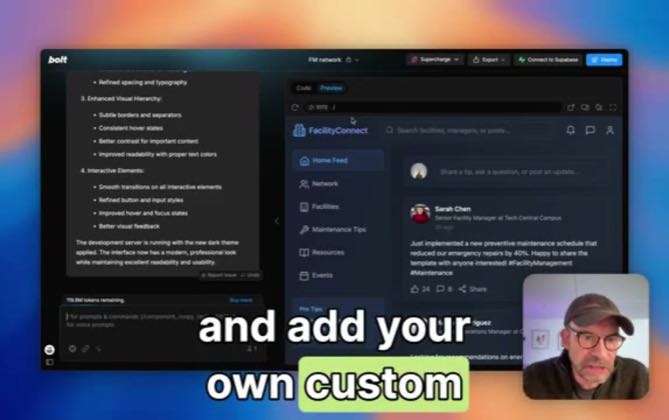
 PAID2:14
Plays here · Open on youtube ↗
“So today we are going to be looking at how to save and add your own custom prompts to Bolt”
The opening line · 0:00 · move: howto
Makes planning or prompt structure the leverage point, then shows Bolt.new converting that instruction into a functioning build: Save your own custom prompts in Bolt.new.
@Supercharge for Bolt · 98 followers · 5 of 8 recent posts mention Bolt.new · creator page →
- 0:00So today we are going to be looking at how to save and add your own custom prompts to Bolt
- 0:07using the Supercharge for Bolt Chrome extension. So just type in slash that brings up the prompt
- 0:14library slightly redesigned from before. Now you have all categories here. So all of the preset
Put the prompt and the working output inside one short proof loop, so a non-coder sees the product before they have time to imagine setup work.
AI educators and beginner-build channels demonstrating a complete app from one plain-language request · 24 creators · 24 posts
Open the full playbook →
this post · other creators who ran it
@Supercharge for Boltyoutube · 98 followers · median 288 views · n=8best post253views · for Bolt.newUnknown “Save your own custom prompts in Bolt.new” identifies Bolt.new; public caption checked, commercial relationship unverified — https://www.youtube.com/watch?v=UpC3ZwAbADEOpen creator →Views and likes are public counts at capture time. The multiple compares this post with the creator’s own recent median, not a claim about what caused its reach. Read the methodology →