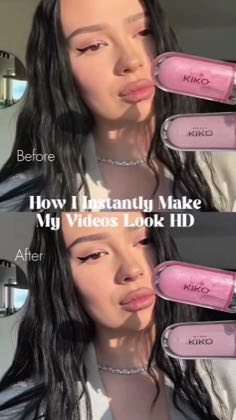
 0:28
0:28Plays here · Open on tiktok ↗
“How I Instantly Make My Videos Look HD”
The opening line · 0:00 · move: howto
Opens on a portrait before/after, runs Wink Image Quality and tonal adjustments to reduce yellow, add skin saturation, deepen shadows and build a soft glow, then closes on the final lip-detail comparison and 4K/60fps save screen.
@𝐘𝐔𝐋𝐈𝐀🌪️ · 51.1K followers · 0 of 30 recent posts mention Wink · creator page →
- 0:00How I Instantly Make My Videos Look HD — Before — After
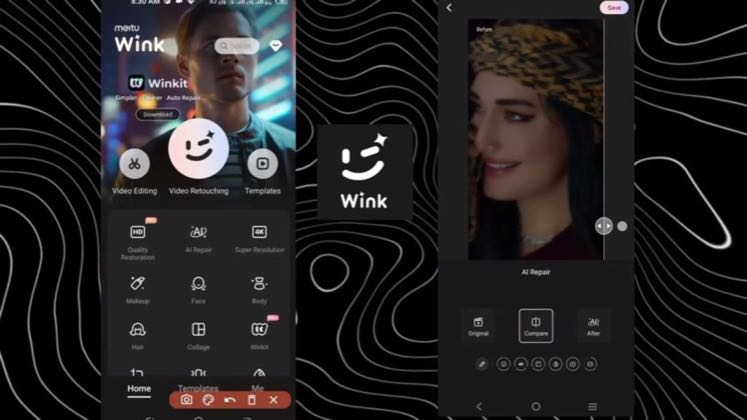
- 0:04📱 Opening the Wink app — UHD — AI Repair — Image Quality — Portrait
- 0:12Processing 88% — More effects means longer processing time — Toning down the yellow for clean whites 🤍 and adding skin saturation
Answer the high-intent 4K, blur-repair and face-smoothing query with the real Wink interface, one source file and a side-by-side result, so search utility—not creator fame—carries discovery.
Mobile-edit tutorial and AI-tool review channels · 93 creators · 110 posts
Open the full playbook →
this post · other creators who ran it
@𝐘𝐔𝐋𝐈𝐀🌪️tiktok · 51.1K followers · median 10.3K views · n=60best post301.5K29.2×views · for WinkUnknown The caption says `I always use this when I want that HD glow — just takes a few taps in Wink` with `#winkapp #wink`, proving Wink attribution; the target object exposes `isAd: true`, but the bounded current-page check did not render a post-specific visible disclosure label, so the commercial relationship remains unknown — https://www.tiktok.com/@yu.huracan/video/7528500790361640214Open creator →Views and likes are public counts at capture time. The multiple compares this post with the creator’s own recent median, not a claim about what caused its reach. Read the methodology →