 1:04
1:04Plays here · Open on youtube ↗
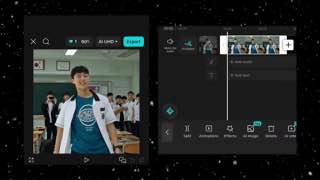
“Wink Video AI & CapCut CC Tutorial 📈 1-Minute Guide to Boost Video Quality!”
The opening line · 0:00 · move: on-screen-text
Silently pairs Wink's AI enhancement and processing step with a CapCut color-correction pass, keeping the source and edited clip side by side so the final contrast stays visible.
@𝑪𝒐𝒍𝒅𝑪𝑽𝑬 · 6.9K followers · 1 of 11 recent posts mention Wink · creator page →
No transcript captured yet.





Preserve the creator's native fandom or gaming workflow, then place Wink at the end as the quality-repair layer that turns a blurry fan cam or compressed mobile edit into the shareable result.
K-pop, anime, Roblox and mobile-gaming editors · 27 creators · 27 posts
Open the full playbook →


this post · other creators who ran it
@𝑪𝒐𝒍𝒅𝑪𝑽𝑬youtube · 6.9K followers · median 272 views · n=11best post1190.4×views · for Winkorganic The public tutorial exposes no paid label, sponsored statement, referral code or creator-specific tracked route; the independently scanned 11-video feed teaches and showcases competing CapCut and Alight Motion workflows, with Wink appearing once. https://www.youtube.com/watch?v=tmSiw6A29K8Open creator →Views and likes are public counts at capture time. The multiple compares this post with the creator’s own recent median, not a claim about what caused its reach. Read the methodology →