 AFFILIATE2:42
Plays here · Open on youtube ↗
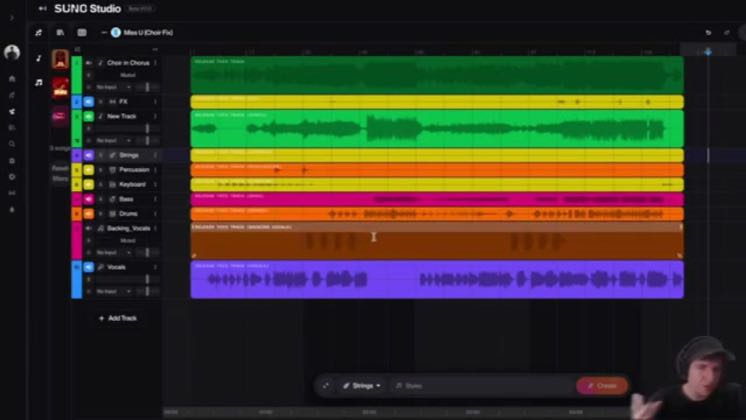
“Hey guys, in this video, I'm going to show you how you can remove AI artifacts from your song "Stems" in Suno Studio.”
The opening line · 0:00 · move: howto
Screen-records the Suno workflow and resolves a concrete creation problem with a visible before-to-output sequence: How To Remove AI Artifacts From Suno Stems (Pro Tutorial).
@Tim Makes Media · — followers · 26 of 30 recent posts mention Suno · creator page →
- 0:00Hey guys, in this video, I'm going to show you how you can remove AI artifacts from your song "Stems" in Suno Studio.
- 0:06So I have this song broken down into multiple stems, and if I play this part here...
- 0:16You'll notice that the strings here sound very fake, very AI, very synthetic.
Remove the musician prerequisite, walk every control on screen, and end with a generated track the viewer can reproduce immediately.
General AI educators and music-tool tutorial channels teaching a complete beginner the interface from prompt to playable result · 25 creators · 25 posts
Open the full playbook →

this post · other creators who ran it
@Tim Makes Mediayoutube · — followers · median 1.6K views · n=60best post66K42.6×views · for Sunoaffiliate “https://suno.pxf.io/OY9dEN” — https://www.youtube.com/watch?v=N2hxjeGUEIsOpen creator →Views and likes are public counts at capture time. The multiple compares this post with the creator’s own recent median, not a claim about what caused its reach. Read the methodology →